
Protected alarms
Set it. Prove it. Start awake.
A protected alarm app that makes dismissal require proof: scan a QR code, complete a challenge, and start the day awake.
Protected alarms
Set it. Prove it. Start awake.
Private by default
Challenge photos stay on your phone.
Personal setup
Your alarms, profile, and recovery in one app.
Built for real mornings
Less tapping. More getting up.
The app
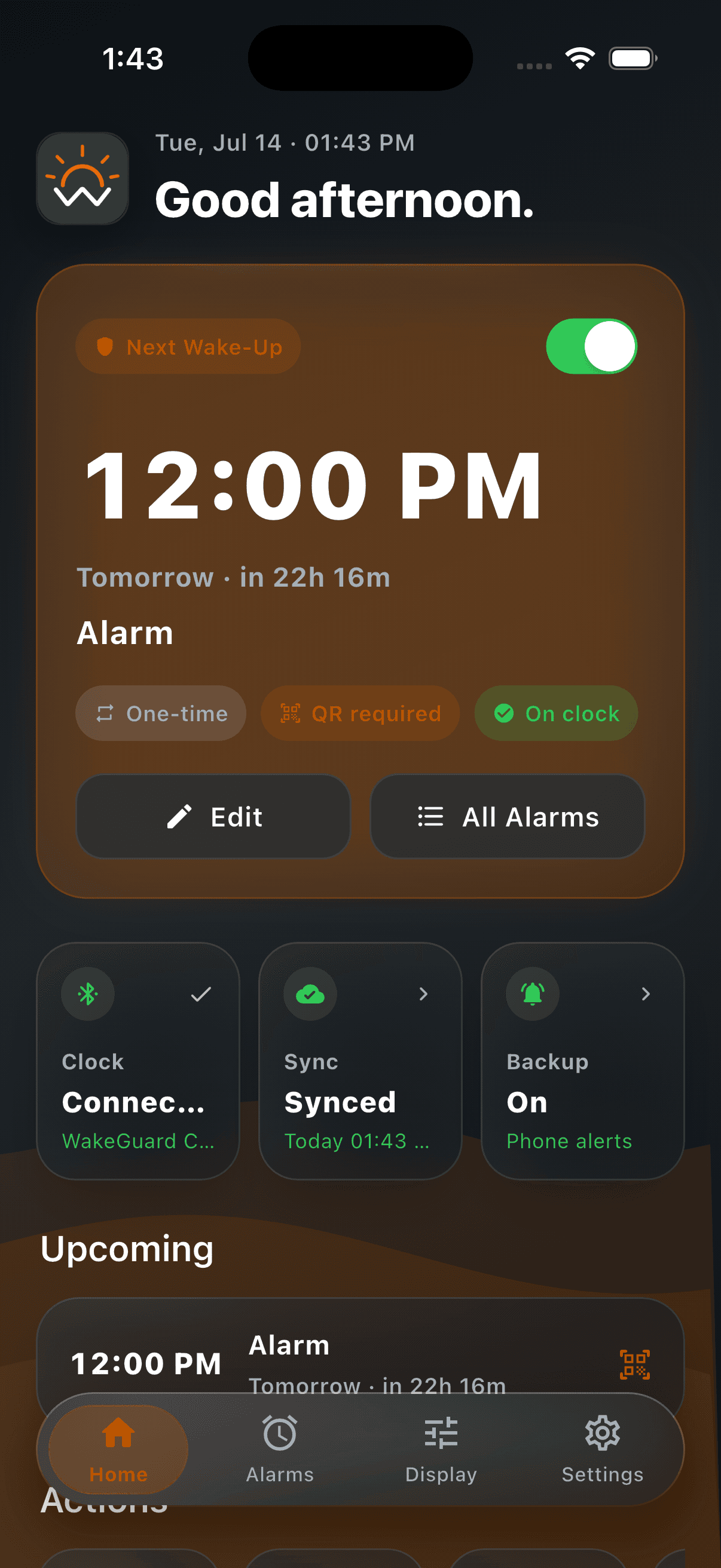
Home, alarms, settings, and account recovery use the same focused interface users see in the current iOS build.
Home
Dashboard
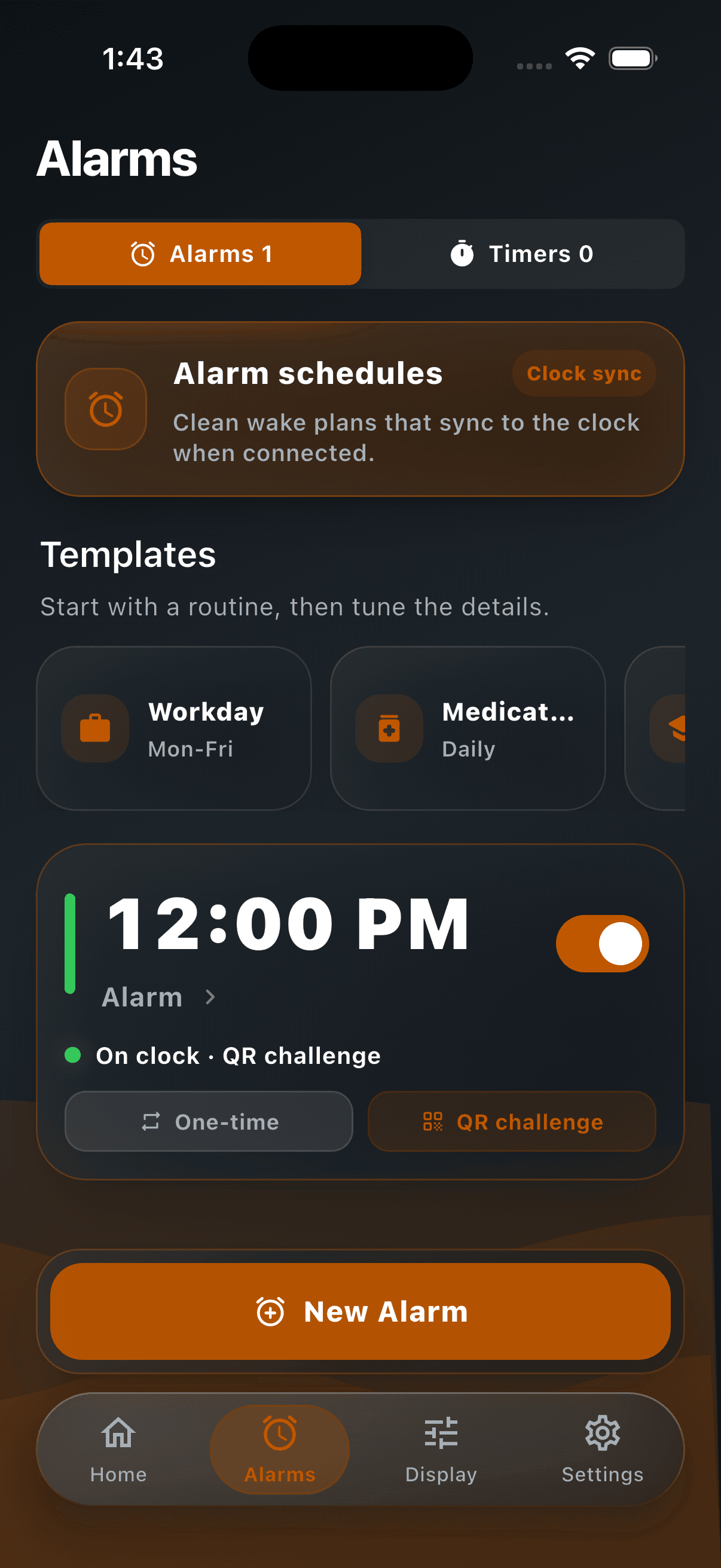
Alarms
Alarm builder
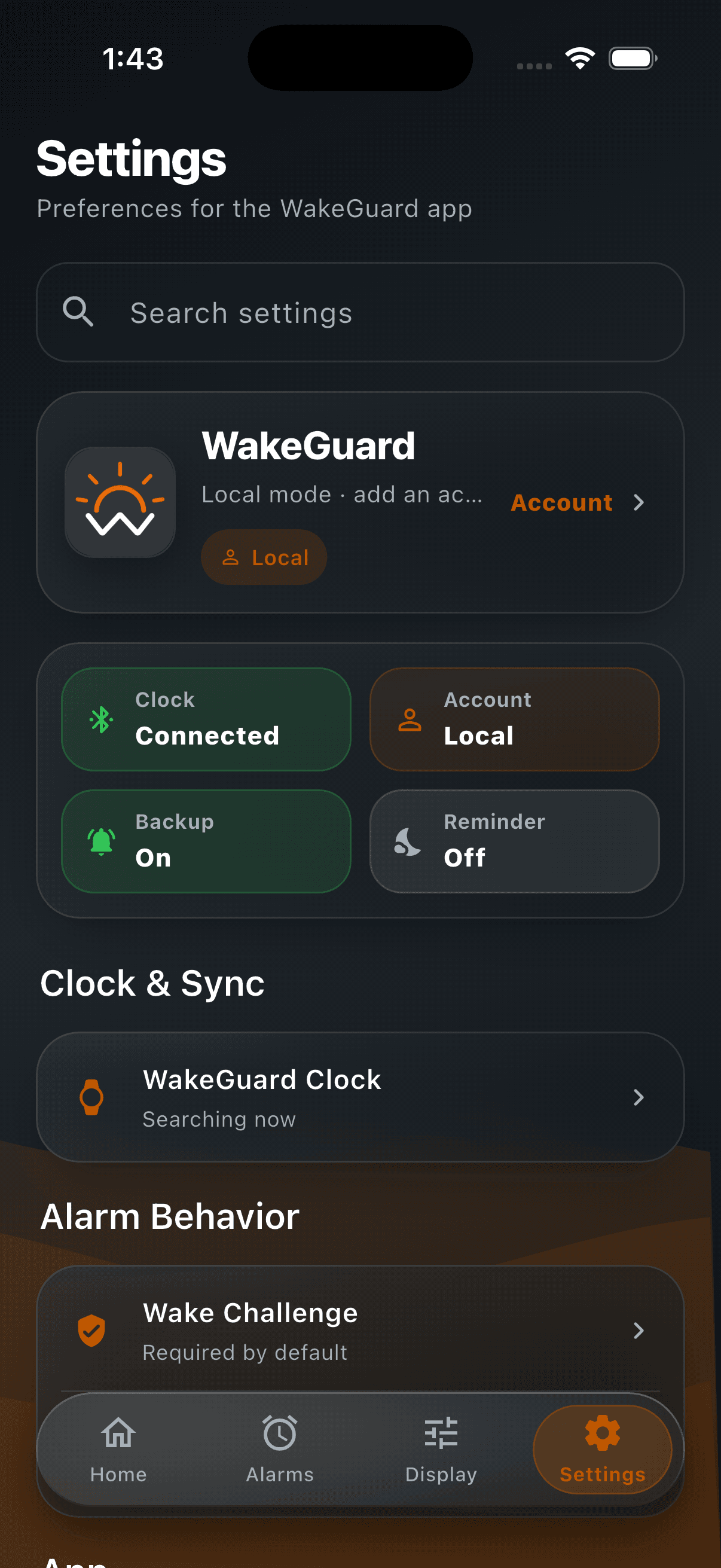
Settings
Search & controls
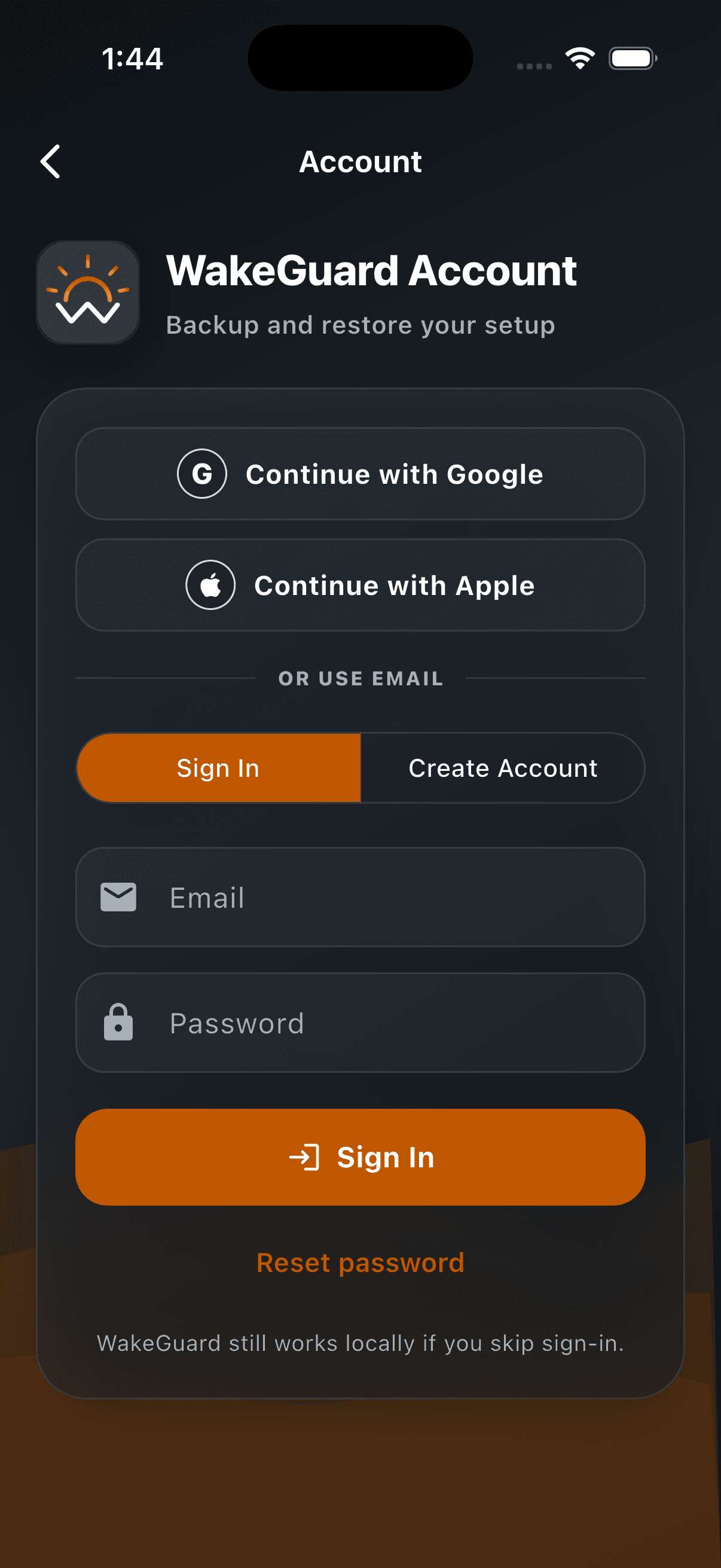
Account
Backup & restore
Interactive demo
WakeGuard is simple on purpose: set the alarm, choose proof, complete the challenge, and keep a record of what happened.
Next Wake-Up
Tomorrow · in 22h
WakeGuard status
Alarm armed
Challenge checks are designed around local verification and clear user control.
Comparison
WakeGuard is not louder for the sake of being louder. It changes what has to happen before dismissal.
Typical alarm
One tap can silence the alarm
No proof that you moved
Easy to dismiss half-awake
Little context after the alarm clears
WakeGuard
Dismissal can require a photo or QR challenge
Proof creates movement before silence
Snooze and templates support real routines
Dismissal history keeps the wake plan visible
The problem
WakeGuard was built for mornings where narcolepsy, severe sleep inertia, or deep drowsiness make regular alarms too easy to silence.
Not a medical device or treatment. Just a routine-support tool that adds proof of movement before the alarm clears.
Alarm rings
Sound starts the loop.
One tap
Half-awake dismissal.
Back asleep
No proof you moved.
Proof before silence
The alarm does not clear until the user completes a deliberate step.
For people living with narcolepsy, waking can mean fighting heavy sleepiness, fragmented rest, and unpredictable alertness.
When your brain is still half asleep, one tap can silence a normal alarm before you remember doing it.
WakeGuard adds a practical step between the alarm and silence: movement, attention, and a wake challenge.
Who it's for
WakeGuard is not a medical device and does not diagnose, treat, cure, prevent, or monitor any condition. It is a routine-support alarm app for people who want dismissal to require attention, movement, and proof.
For people who experience intense morning sleepiness and need a practical routine support tool that does not rely on one-tap dismissal.
For mornings where your body wakes before your awareness does, and an alarm needs to create one more deliberate step.
For anyone who has turned off an alarm, fallen back asleep, and only realized what happened later.
For students who need extra confidence before classes, exams, labs, and early responsibilities.
For early starts, rotating shifts, and routines that need templates, reminders, and recovery options.
How it works
The photo challenge is the core WakeGuard experience. QR code and one-tap modes stay available when a lighter routine makes sense.
Pick a real household object kept away from your bed — a toothbrush, the coffee maker. When the alarm rings, you have to walk to it and photograph it. An on-device model confirms the match. No object, no silence.
Bathroom sink
Object match required
Fallback
One printed paper code dismisses any protected alarm. It lives away from your nightstand, not on your phone. For photo alarms it only unlocks 3 minutes in — there is deliberately no “dismiss anyway” escape hatch.
Optional
Want a normal alarm alongside your protected ones? Set any alarm to a simple one-tap dismiss. You choose the level of friction per alarm.
Digital alarm system
WakeGuard should feel valuable the moment someone opens it: create smarter alarms, manage routines, personalize the experience, restore from the cloud, and replay onboarding without restarting the app.
Create alarms with repeat days, labels, volume, snooze limits, gradual wake, and the exact dismissal challenge you want.
Keep timers, alarm templates, and wake routines in one place so the app feels useful before anything else is set up.
Let users add a name, photo, and optional account so greetings, backups, and settings feel personal.
Signed-in users can recover profile details and alarm backups without rebuilding their setup from scratch.
Search, account controls, privacy, onboarding replay, and support live in a calmer settings experience.
Photo matching is designed around local verification, clear fallback controls, and no photo uploads.
Setup
WakeGuard should explain itself quickly, then give users control over profile, alarms, backups, and onboarding replay from the same digital experience.
Learn the wake challenge flow, why the app exists, and how protected dismissals work.
Add a name, profile photo, and optional sign-in so settings and backups feel personal.
Set time, repeat days, volume, gradual wake-up, snooze limits, and the wake challenge.
Use cloud restore, QR fallback, and clear settings so recovery never feels hidden.
Reopen onboarding from settings whenever you want to revisit the setup flow.
Features
Object matching runs entirely on your phone. No images ever leave the device.
A single app-wide printed code as a fallback for every protected alarm.
Set challenge type, repeat days, volume, labels, snooze limits, and gradual wake-up.
Save common alarm routines so school, work, and weekend schedules are faster to rebuild.
Swipe actions, detail pages, and compact cards keep the alarm tab easy to scan.
Configure max snooze count and duration for each alarm.
Keep timer controls visually separate from alarms so each mode feels deliberate.
Use evening nudges to set tomorrow's wake plan before you are already tired.
A log in the app of when and how each alarm was cleared.
Optional account sync can restore profile details and alarm backups.
Names and profile photos make greetings, settings, and account screens feel human.
Find onboarding replay, support, privacy, account, and restore controls quickly.
Restart the walkthrough from settings without reinstalling or clearing app data.
Theme, accent, live preview, and display preferences live in one polished area.
Challenge photos stay local, accounts are optional, and the app explains what it stores.
Privacy
WakeGuard asks for trust at a vulnerable time: right after waking up. The product should be clear about what stays local, what syncs, and why.
Photo matching is designed to happen locally on the phone. WakeGuard does not upload challenge photos.
Create an account only if you want profile sync and alarm backups. Local mode remains available.
Account data is used for functionality like sign-in, profile sync, and restore. The app is not built around ads.
Protected alarms, local setup, and privacy-first defaults are not hidden behind a subscription.
The story
WakeGuard started from a simple frustration: when someone is still half asleep, the easiest action usually wins. One tap can erase the alarm before the day has even started.
The team focused on a more realistic wake flow: make the alarm clear, make the next action obvious, and require proof before dismissal.
The app is built for real morning behavior, not ideal morning behavior.
Waitlist feedback helps decide which routines, challenges, and recovery tools matter most.
Roadmap
The waitlist helps prioritize the details that matter before WakeGuard reaches the App Store.
Now
Collect early users, invite testers, and learn which wake routines need the most polish.
01
Beta
Tune alarm creation, photo/QR challenges, onboarding replay, and dismissal history.
02
Next
Improve account backup, profile sync, alarm restore, and setup recovery across devices.
03
Launch
Prepare the iOS listing, privacy details, accessibility polish, and final launch feedback loop.
04
Roadmap items may shift based on beta testing and App Store review requirements.
FAQ
WakeGuard is meant to feel serious without feeling complicated. Here are the questions people usually ask before joining the beta.
Account
Optional
Photos
On device
Beta
TestFlight
Ask about TestFlight access, setup, privacy, or whether WakeGuard fits your wake routine.
Contact supportYes, WakeGuard is designed for locked-phone mornings through iOS alarm notifications and in-app permission checks. For the best result, keep notifications enabled, volume available, and review Focus or Silent Mode settings before relying on an alarm.
Yes. WakeGuard is built as an iPhone-first alarm app. Clock sync adds another layer when available, but the core alarm setup, challenges, reminders, and local profile experience live in the app.
WakeGuard is built around protected dismissal. Instead of one sleepy tap, you can require a photo or QR challenge, limit snoozes, save templates, and review your wake routine in one place.
No. Accounts are optional. You can use WakeGuard locally, then sign in only if you want profile sync, alarm backups, or cloud restore.
Yes. Onboarding can be replayed from settings, so you can revisit protected dismissals, setup steps, and recovery guidance without reinstalling the app.
If you used an account with backup enabled, WakeGuard can help restore profile details and alarm setup. If you stayed local-only, your setup remains on the original device.
No. WakeGuard is designed so photo matching runs on the phone. Challenge photos are not uploaded to WakeGuard servers.
No. WakeGuard is a routine-support alarm tool. It does not diagnose, treat, cure, prevent, or monitor any medical condition.
No. WakeGuard has no advertising model. Optional account data is used for app functionality such as authentication, profile sync, and alarm backup.
Built around the phone app, with optional clock sync.
Replay onboarding and restore from backup when enabled.
A routine-support tool, not diagnosis or treatment.
Waitlist
Get early access updates, TestFlight invite information, and a chance to shape the protected alarm flow before launch.